Showing posts with label servo. Show all posts

Friday, October 28, 2016

Photocell Data in ThingSpeak Can Trigger a Servo on Photon (#IoT)


In the process of learning about how the Internet of Things works, as I attempt to create a wifi-connected book, I wanted to figure out how to get sensor data from a ThingSpeak channel to trigger a Particle function, even if the data I'm using isn't super juicy.

In an earlier post, I set up my own private ThingSpeak channel and connected it to the Particle API via a web hook.  Since then, I've updated my code so that it maps the value of the analog data, constricting the readings within a range of 0-255 instead of 0-4095.
While playing around with ThingSpeak this time, I used the React and ThingHTTP apps to use the data from the photocell to trigger a servo connected to a Photon. The React app allowed me to set up a trigger related to the data.  I set it up so that a reaction would happen any time the sensor picked up a value of 30 or under (or when it was sunny and the resistance dipped).  Then, the ThingHTTP app allowed me to post an HTTP request to Particle, in much the same way you would if using the Maker Channel on If Then Than That (IFTTT).

This breakthrough is exciting, because I have figured out how to control a physical object using my own data.  Now, if I wanted to, I could use the data from a photocell to trigger a piezo tune, a servo, or an LED light show, based upon whether it's sunny or dark outside.  I'm not yet sure how I'll use this new knowledge, but it's mine nonetheless!

Friday, October 21, 2016

Triggering a Photon Servo with a QR Code (#IoT)


In my last post, I got a servo running on a Photon by using web requests sent from Node.js and Twitter. After getting to that point, I wondered how I might automate the process so that someone else could trigger my servo, if I were to integrate one into a wifi-connected book.  Today, I had an idea that this might be achieved by creating a QR code.  I wasn't sure whether this was possible until I came across a blog by Trevor Fox. While his post was related to a completely different (albeit clever) use of the QR code, I noticed that he was using If Then Than That (IFTTT) like I was, when I created my web request for Twitter.  This prompted me to do some experimenting which ended up working!

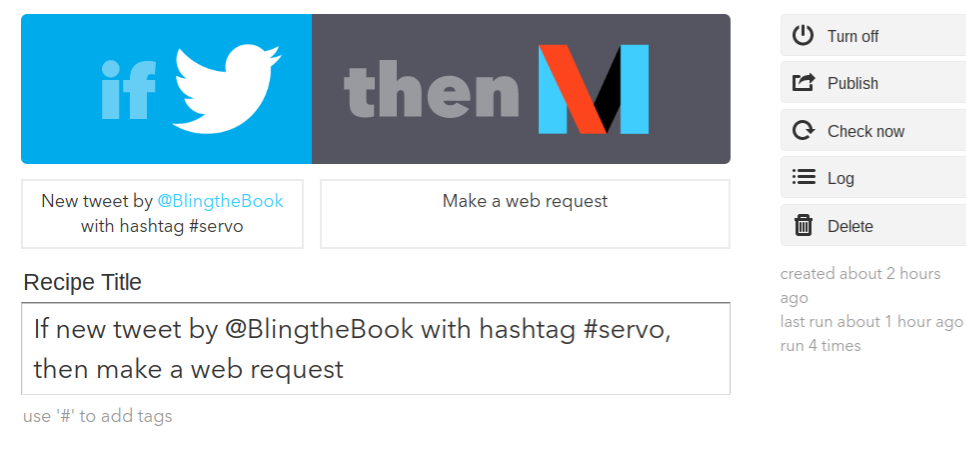
The last time I played with my servo, I created a recipe that paired Twitter with an "Action" on the Maker Channel.  The "Action" was a web POST.  When paired with the hashtag #servo, it triggered a Particle function that made the servo move.  This time, I needed to create a "Trigger" to receive a web request.
The "Trigger" became a unique URL that I could then paste into a QR code generator to produce a QR code.   


After making a new recipe on IFTTT that used the "Trigger" to call the "Action," I was able to control the servo by scanning the QR code.


To learn more, visit "How to Trigger Events" on the Maker Channel page.   

WARNING:  Using a QR could become a security issue, if someone really wanted to try to figure out your IFTTT key. 

Monday, October 17, 2016

Controlling a Servo with Photon (#IoT) #progress


I'm continuing my exploration of the Photon today and am happy to report a couple new things that I've learned.  My initial goal was to get a servo up and running and to control it via Twitter.

Thanks to some open source code from MIT, shared on the Spark Fun website, I was able to get my servo to run at an established time and date, which is pretty cool!  The code that I'm using was designed to have a servo tip fish food into a tank at a certain point in time, but an additional Particle function in the code also allows the servo to be moved via a web request.
Wiskers is the name of my device.  Feed is the name of the Particle function.
Although I was able to quickly get the servo to work by calling the function in the command line that I set up using Node.js, creating the web request was a little trickier.  In order to call the function on If Then Then That (IFTTT), I had to provide the device ID and authentication code for my Photon, as well as a unique URL linking to Particle.  This took a while to figure out, but it's working now.  I just have to remember to refresh my recipe in ITFFF whenever I change the code in the Particle app.
In any case, I am trying to imagine how I might embed a tiny servo into a book to help advance a narrative. It would have to be smaller than the one I'm using now.  Off the top of my head, I can imagine a servo powering a tiny propeller in a steampunk book.  Now, I need to figure out a way to allow the servo to be triggered by someone other than me.  I'm not yet sure how to automate that, but I'll keep taking baby steps until I figure it out.