Showing posts with label music. Show all posts

Tuesday, October 25, 2016

Triggering a Rickroll on a Photon with a QR Code (#IoT)


Over the past couple of days, there has been a lot of news circulating about security issues present in gadgets connected to the Internet of Things.  Keeping that in mind, I'm cautiously continuing my experimentation with the Photon, trying to be mindful of the fact that there are privacy risks involved in transforming ordinary objects into smart objects.

Thinking about ways that music might contribute to the creation of an interactive book that I'm going to be creating, I started tinkering with the code from Spark Fun's Music Time tutorial that plays Rick Astley's song "Never Going to Give You Up."  I tweaked the code by creating a new Particle function that only plays the music when the function is triggered by a web call.  I used the Maker Channel on If Then Than That to trigger it and linked it to a QR code (see previous post).

Even though electronic buzzer music can be a little annoying, I'm thinking that it would be interesting if QR codes embedded into a book could trigger different tunes or sound effects to help advance a narrative. 

Monday, August 15, 2016

MIDI to Arduino: Easily Add Music to Your Wearable Electronics!

I just discovered a magical tool that can convert a MIDI file directly into Arduino code that may be uploaded to a wearable microcontroller such as a Lilypad!  It's called Green Light Go -- Midi to Arduino Source Code Generator.


Using this tool is a MUCH easier way to code music than trying to use sheet music and a frequency chart to cobble a song together.  (Ask me how I know.)

To get started, your computer needs some type of MIDI sequencing/notation software, such as Rosegarden, which is open source.  From there, you'll be able to upload MIDI files and modify the names of individual tracks to correspond with the pins on your microcontroller.  This demo video explains exactly how it works.

Here's a video of my Lilypad playing the Simon and Garfunkel song The Sound of Silence through a buzzer on pin 7.

  • I started by finding a MIDI file I wanted to use on this site.
  • Next, I uploaded The Sound Of Silence [4] (MIDI sequencing by Mick O'Neill) into Rosegarden.
  • After changing the names of the tracks, I exported the file as a new MIDI file, which I then uploaded into Green Light Go.  
  • Once the code was generated, I pasted it into an Arduino sketch on Codebender and uploaded it to my Lilypad.  You can find the code for it here.
In the process of tinkering, I learned that MIDI files with a short simple tracks work much better than sophisticated files with lengthy tracks.


Saturday, December 6, 2014

Lily Pad Coding Day 2: My Music and Lights are in Sync!

The video below might not look like much, but I spent nearly all day today getting my Lily Pad to sync up with flashing green and red lights!

Here is a link to the code that I used, which is a combination of the music I coded last week (see previous post) and someone else's code for the lights.

The biggest problem that I am having at the moment is that there is a long pause at the end of the song and a couple of lights are flashing for reasons I cannot figure out.

My next step is to figure out how to get the music to turn on with a temperature sensor.


Sunday, November 30, 2014

Baby, It's Cold Outside (LilyPad style)

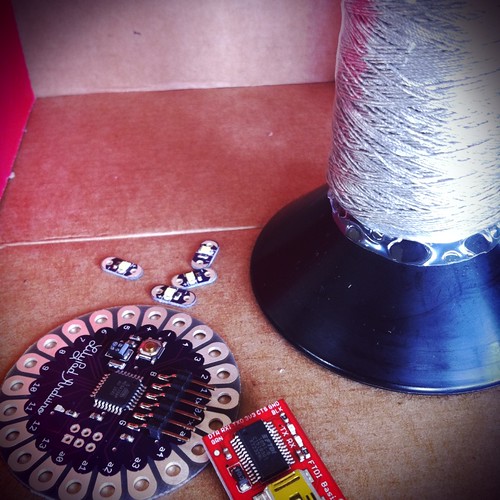
Lilypad with conductive thread by sameerhalai, on Flickr
Creative Commons Creative Commons Attribution-Noncommercial-Share Alike 2.0 Generic License   by  sameerhalai 

In a previous post, I shared the first musical composition that I coded for my LilyPad, a lullaby that I used to sing to my daughter.  Over the weekend, I sat down and started coding the song "Baby, It's Cold Outside," to get myself in the holiday spirit!  I used this frequency chart to match the notes on the sheet music.  Ideally, I'd like to create a scarf that plays this song and flashes multicolored lights when the temperature dips.

I haven't yet figured out how to program lights to flash in sync with my music, but that is next on my list.  Here is the code that I wrote.

The video is less than thrilling, but you can hear how my song is progressing.  I would appreciate any feedback you might have.


Saturday, September 14, 2013

Royalty Free Music

One of the concepts that I am focusing on with my students is the importance of digital citizenship. While teaching students about the importance of citing their sources, and reminding them to only use media that they have the right to use, it's important that educators make this process as easy for students as possible.

I recently spent an afternoon looking for an easy way for students and teachers to access high quality audio clips for presentations, without a lot of fuss. I am pleased to report on two very impressive sites. The first site is called Royalty Free Music.

Educators/Students who visit the link http://www.royaltyfreemusic.com/free-music-clips.html must provide a live email address and complete a brief survey in order to download 30-second music clips. These clips are free to use for educational purposes, so long as the site is properly credited. I highly recommend this site!

The second site that I recommend is Freesound.org. Like the previous site, this one requires users to sign in with an email account. Freesound.org is notable because users may search for music that is licensed under Creative Commons. There is also a bookmarking feature within the site, making it easy for users to mark notable sounds for future reference.